Inventory Reporting and Analytics
Query, analyze, and export data across every module with 260+ configurable reports and real-time dashboards.
Comprehensive Report Library
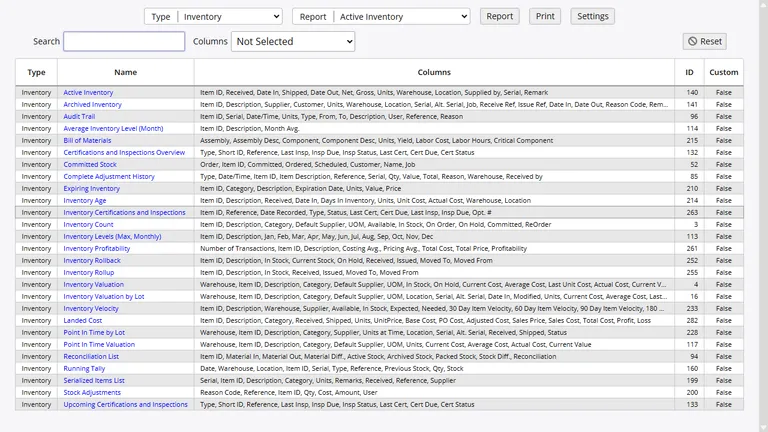
InventoryPro ships with more than 260 reports organized by category: inventory, purchasing, shipping, receiving, assets, warehouses, customers, suppliers, and system administration. Each report supports on-screen viewing, direct printing, and export to Microsoft Excel-compatible CSV format.
- Built-in search, column sorting, and filtering
- Report access controlled via permissions system
- Excel/CSV export for all report types
Real-Time Dashboards
Dashboards aggregate key performance indicators from across the system into a single view. Charts, graphs, lists, and data summaries update in real time as transactions are processed.
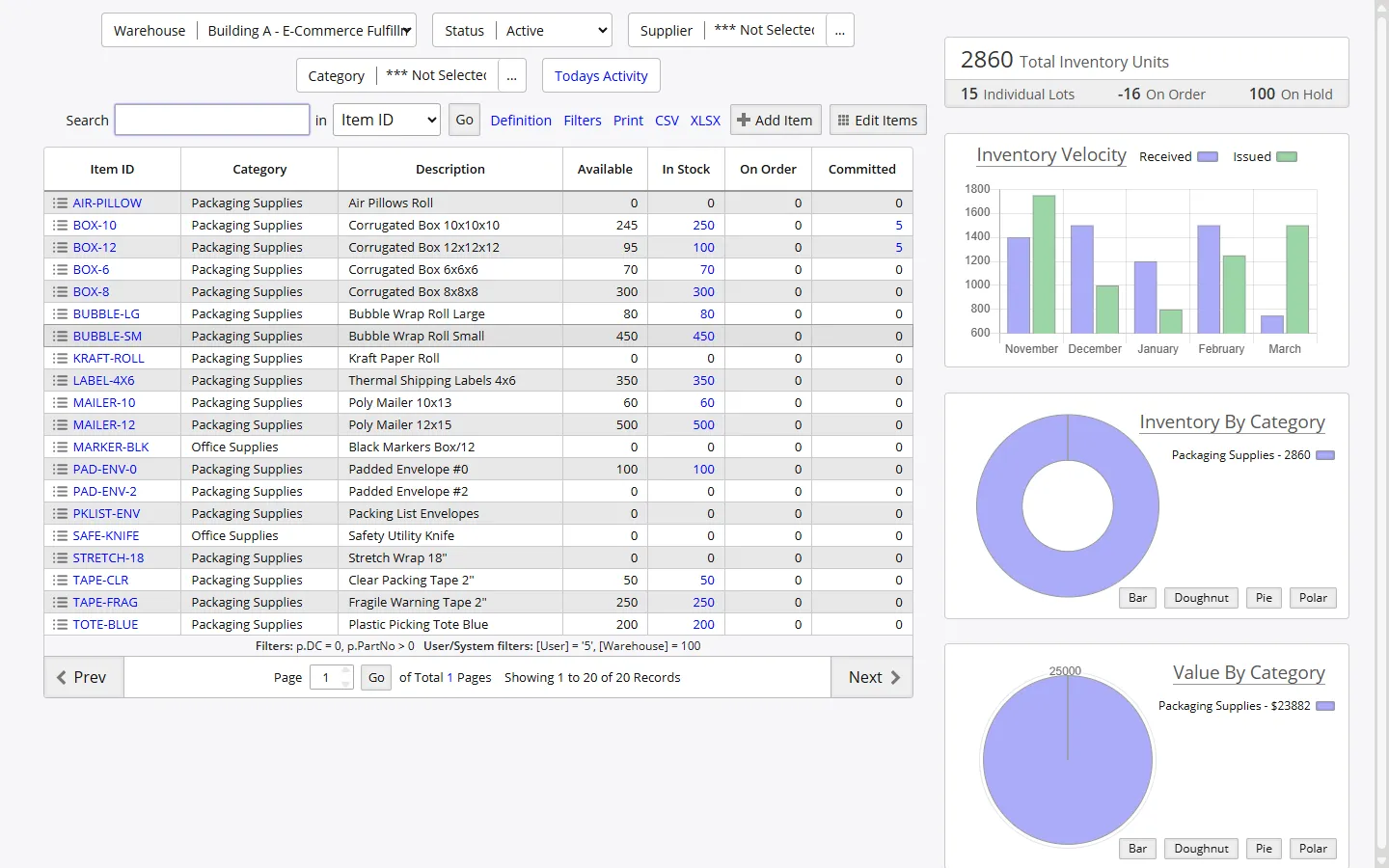
At-a-glance visibility into top-moving items, low-stock alerts, pending orders, recent receiving activity, and fulfillment throughput helps operations leaders identify bottlenecks before they affect delivery commitments.
Report Categories
Reports are organized into functional categories that align with operational responsibilities. Each category provides targeted reporting for the teams that need the data most.
Inventory Reports
Valuation, allocation, rollback to any date, landed cost analysis, and item-level transaction history.
Order Reports
Purchase order status, shipping order fulfillment, work order progress, and backorder tracking.
Asset Reports
Asset inventory, depreciation schedules, maintenance history, and assignment tracking.
Warehouse Reports
Location utilization, inter-warehouse transfers, receiving and shipping activity by facility.
Financial Reports
Point-in-time valuation, cost analysis, supplier pricing, and customer billing summaries.
Audit and Compliance
Transaction audit trails, user activity logs, cycle count variance reports, and change tracking.
Audit Trail and Change Tracking
Every transaction in InventoryPro is recorded with a date and time stamp, the responsible user, a reason code, reference number, and complete line-item detail. The audit trail provides a sequential record of all inventory movements, order changes, and administrative actions that have occurred in the system. Rollback reports reconstruct inventory positions at any historical point in time, supporting year-end financial valuations and regulatory compliance reviews.
Change tracking extends beyond transactions to include modifications to item records, cost adjustments, and configuration changes. For organizations operating in regulated environments, these capabilities provide the documentation foundation needed to demonstrate accountability and control over inventory-related processes.
Custom and Configurable Reports
Beyond the standard report library, InventoryPro provides tools for creating organization-specific reports. Administrators can copy existing reports and modify column selections, display widths, filters, and sorting rules to match their operational needs. Custom reports are flagged to prevent accidental overwrite during system updates.
Report definitions use SQL queries with special substitution values for the current user's warehouse, customer, vendor, and date context. URL links within reports enable drill-down navigation to related records, turning static reports into interactive data exploration tools. Our team also builds specialized reports for clients whose requirements extend beyond what the standard configuration tools provide.
Automated Alerts and Notifications
The alerts and notifications system monitors system activity and triggers automated communications based on configurable conditions. Low-stock alerts, order status changes, receiving confirmations, and expiration warnings can be delivered via email to the appropriate stakeholders. Automated report distribution sends scheduled reports to designated recipients without manual intervention.
For organizations managing large catalogs or distributed operations, these automated capabilities reduce the monitoring burden on your team and ensure that critical events receive prompt attention. Alert configurations are managed through the administration interface, allowing operations managers to adjust thresholds and notification rules as business conditions evolve.
Turn Operational Data into Actionable Insight
Our team will demonstrate how the InventoryPro reporting engine maps to your organization's KPIs and compliance requirements.